The best headphones for work depend on whether you need a clear call mic, fewer nearby distractions, or awareness of people around you. Compare the connection and fit first, then choose between a call-focused headset, noise-canceling over-ears, and open-ear designs.
Quick Top Products
SHOKZ OpenComm2
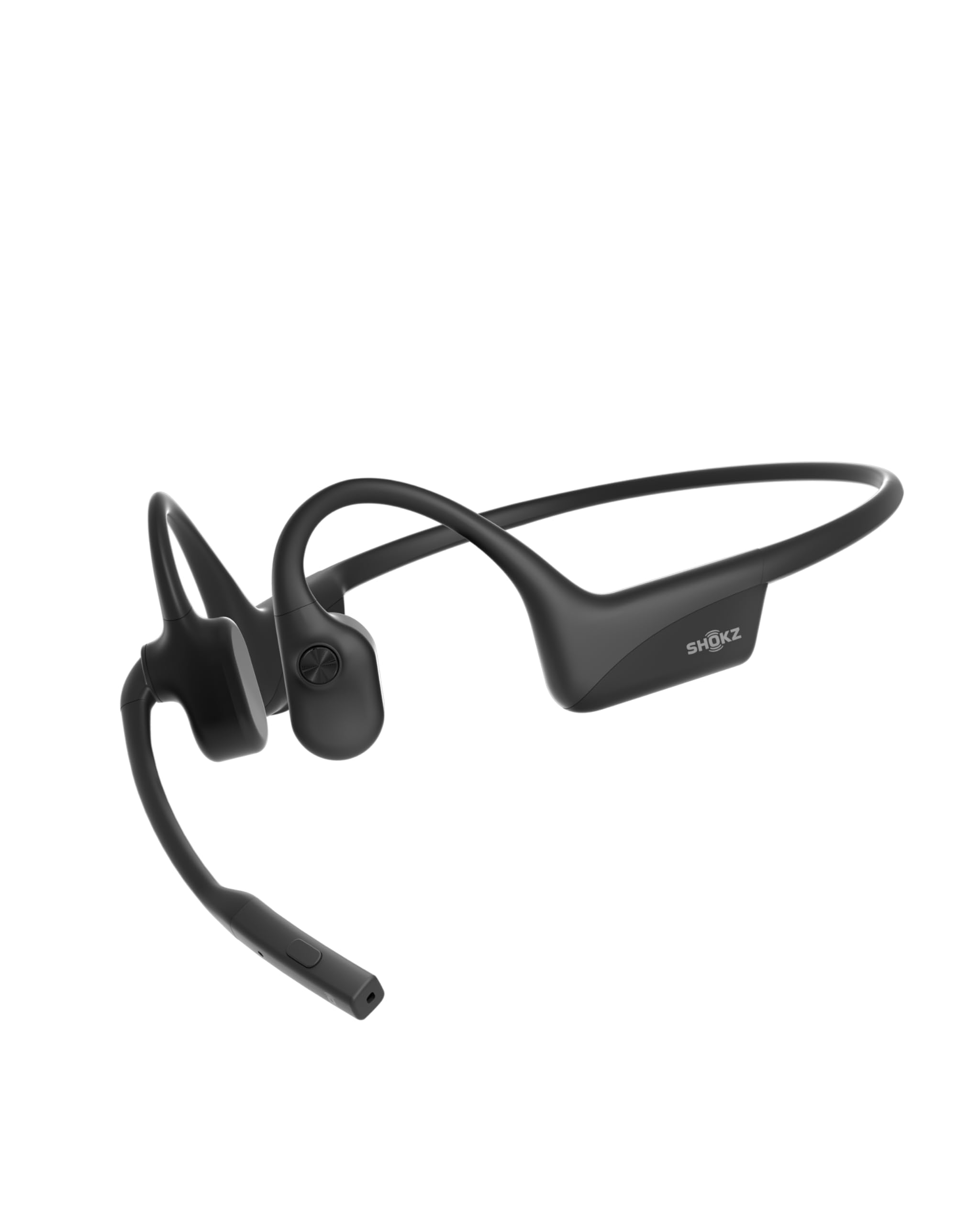
- Open-ear bone conduction design keeps your ears unobstructed.
- Noise-canceling microphone and mute button support work calls.
- Pairs with two devices and provides up to 16 hours of talk time.
Best For: People who spend much of the workday on calls and want to keep their ears open.

TREBLAB Z2
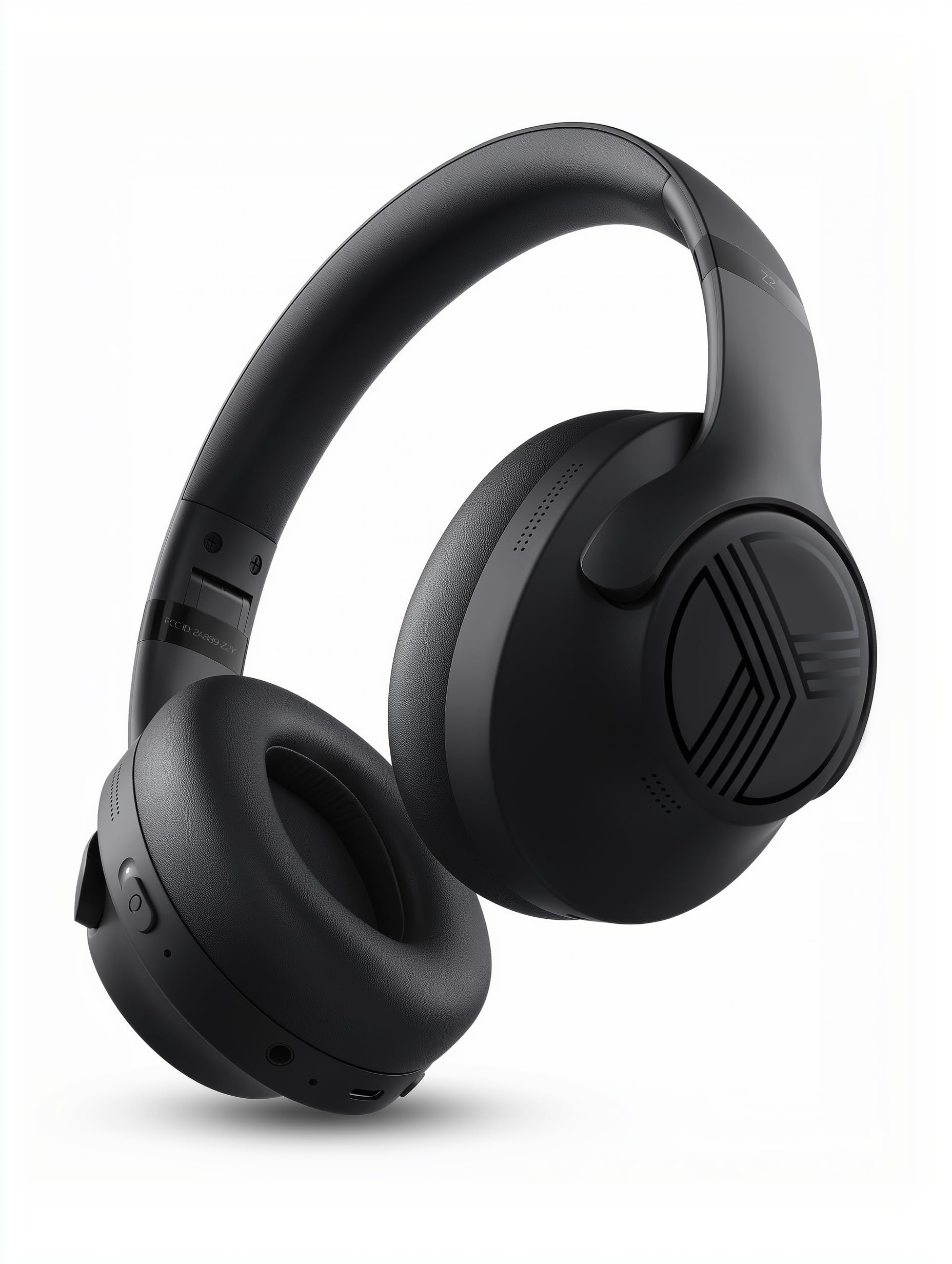
- Hybrid ANC is paired with over-ear cushions.
- Multipoint connects a phone and laptop simultaneously.
- Foldable headphones include a case and wired AUX support.
Best For: Office workers who want over-ear cushioning, ANC, and simultaneous laptop and phone connections.
JLab Go Work

- Rotating boom mic shifts between listening and calls.
- The red LED shows when the microphone is muted.
- Bluetooth multipoint connects two devices simultaneously.
Best For: Remote workers who want a dedicated boom microphone and an easy-to-see mute indicator.
JLab JBuds Lux ANC
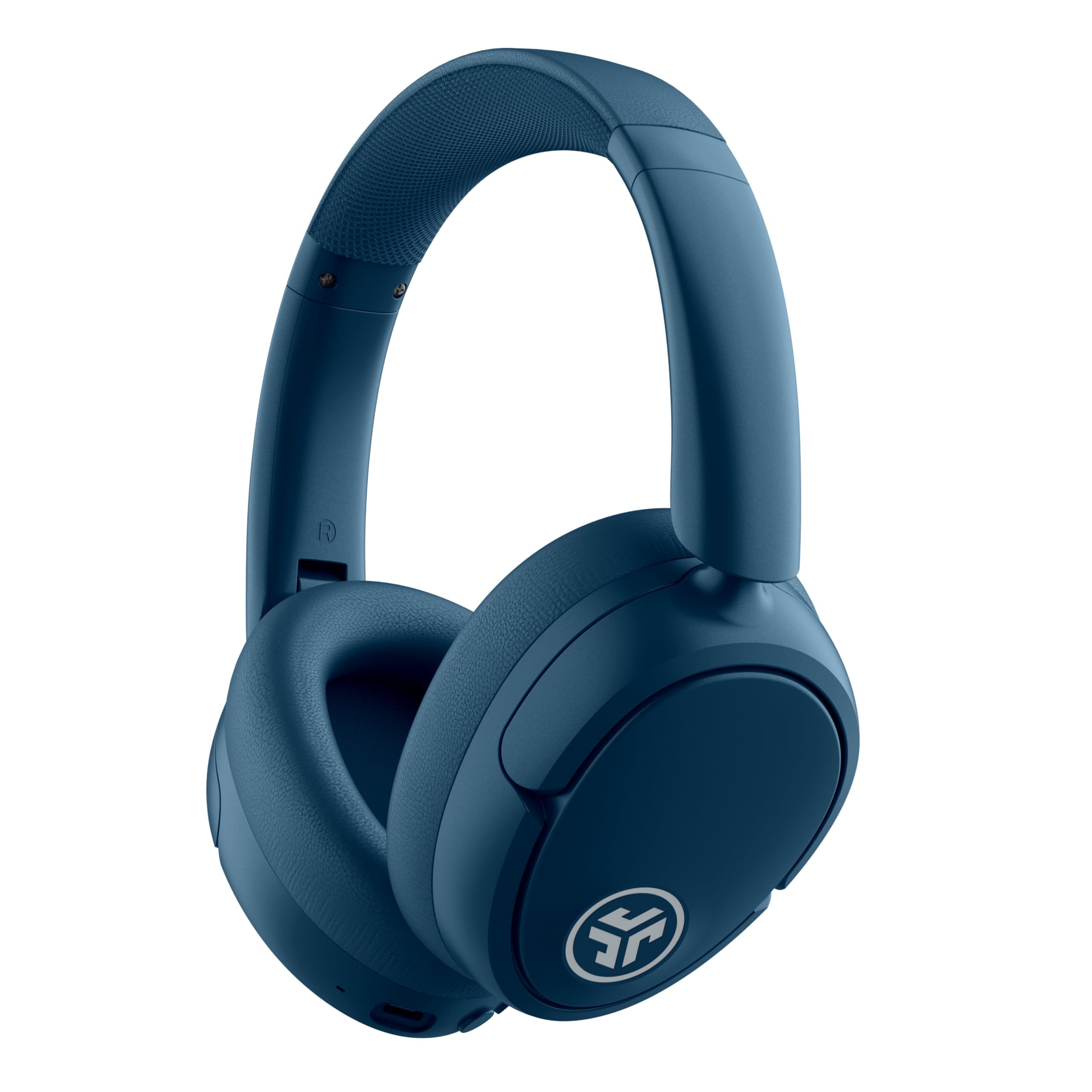
- Hybrid ANC is rated to block up to 35 dB of noise.
- Multipoint connects two devices simultaneously.
- ANC mode playtime is listed at 40+ hours.
Best For: Workers who want over-ear ANC, long battery claims, and two-device Bluetooth multipoint.
SHOKZ OpenFit 2
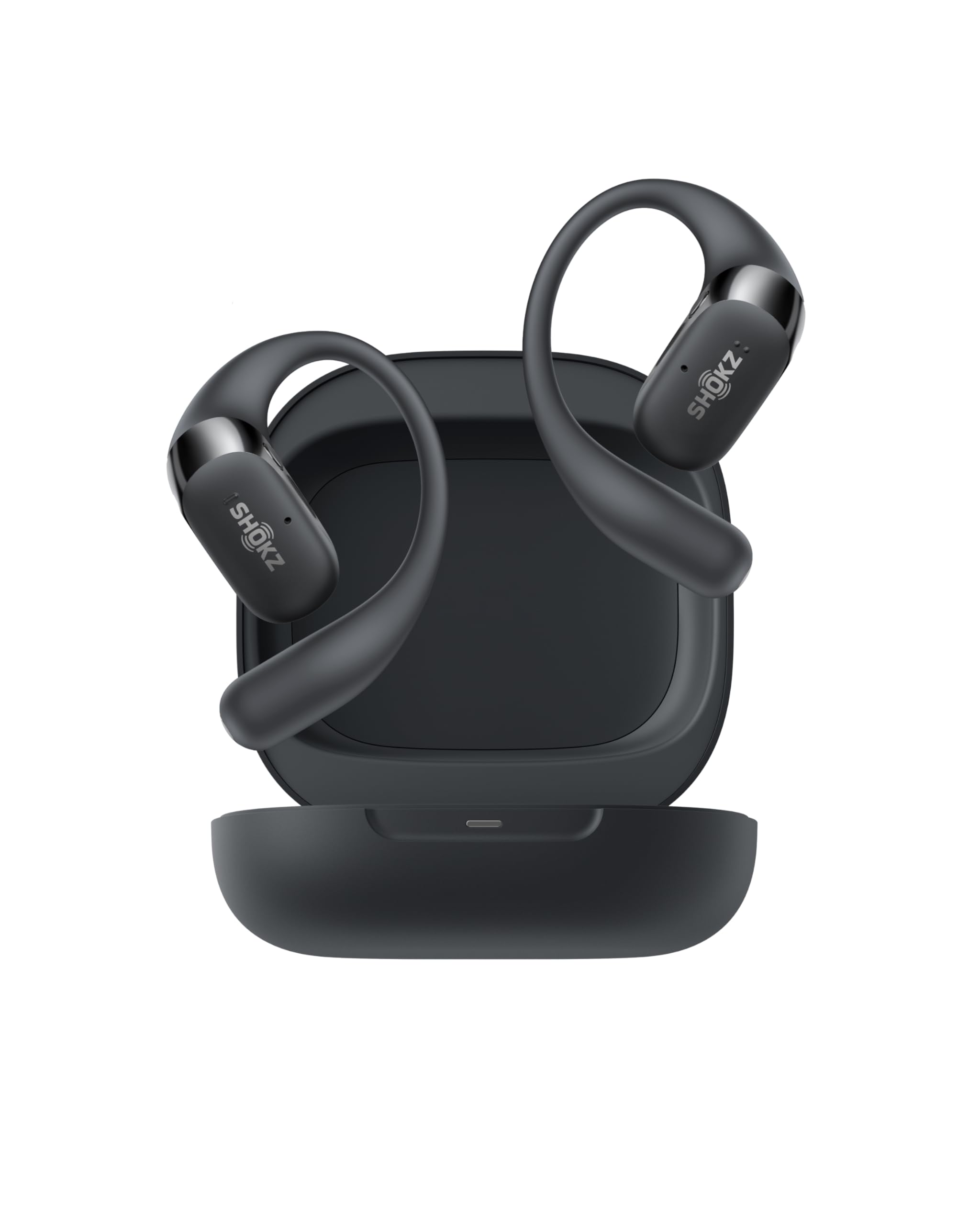
- Open-ear design maintains awareness of the surroundings.
- Physical buttons can switch between two paired devices.
- The case extends total battery life to 48 hours.
Best For: Workers who want open-ear awareness, earhooks, and frequent device switching.
JLab Studio Pro
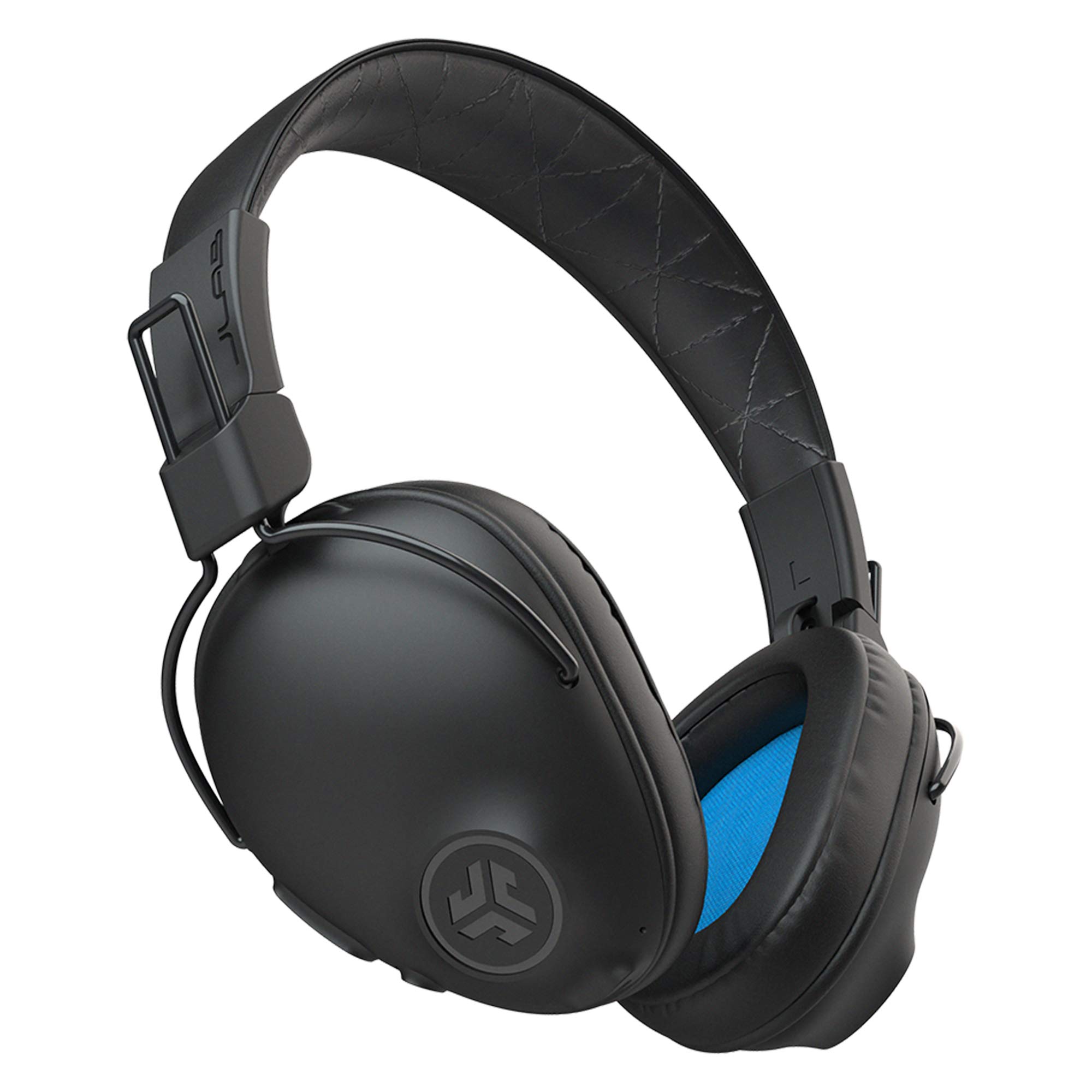
- The headphones are rated for 50+ hours of wireless listening.
- EQ modes are accessible directly on the earcup.
- Foldable design and Cloud Foam cushions support daily use.
Best For: Workers who want a simple wireless over-ear pair with long stated battery life and on-device EQ modes.
SHOKZ OpenRun Pro
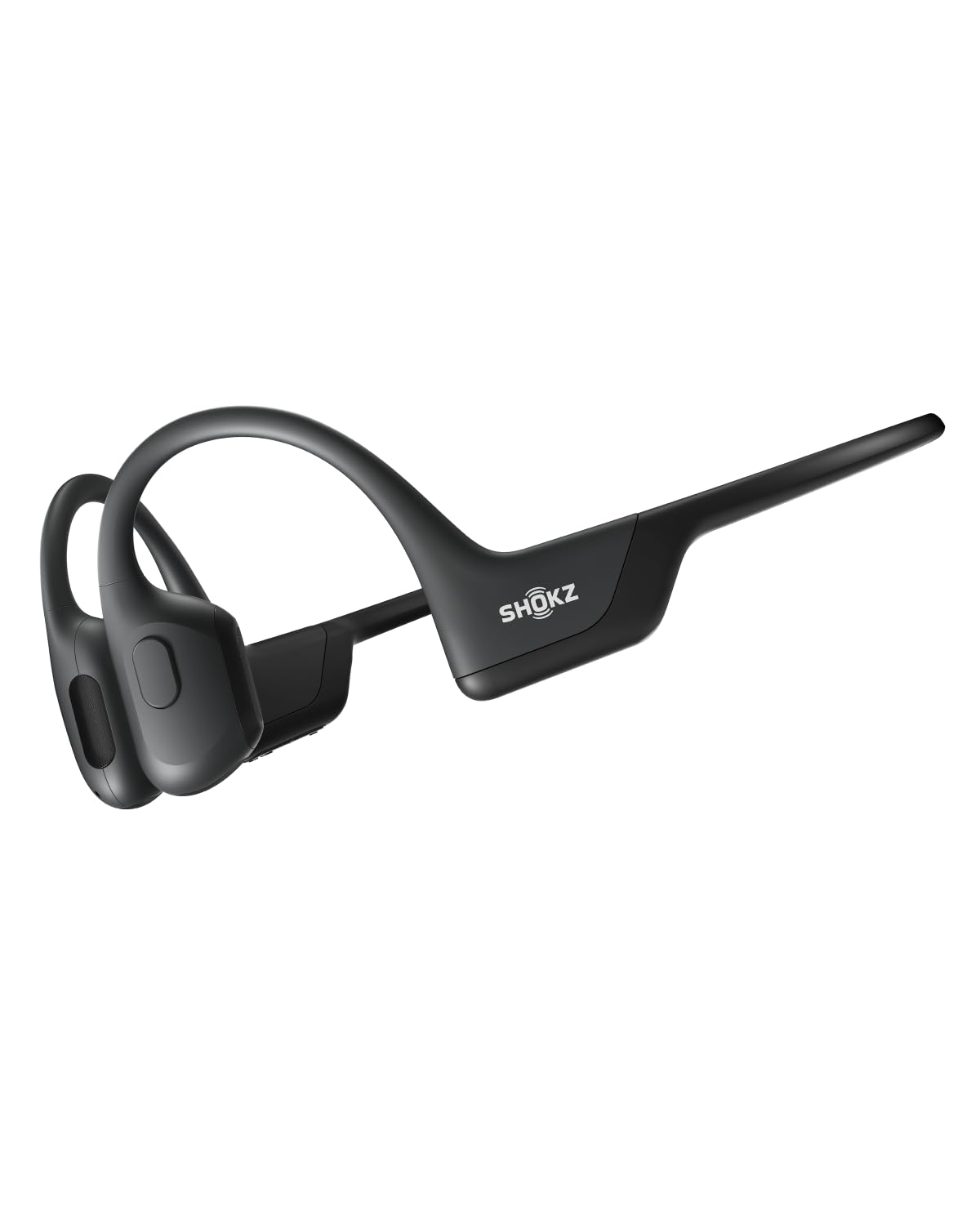
- Bone conduction delivers audio through the cheekbone, leaving ears uncovered.
- The wraparound titanium frame is designed to stay in place.
- Battery life is up to 10 hours for music and calls.
Best For: Workers who want to hear nearby activity while taking calls or listening during movement.
JLab Studio Wireless

- Bluetooth 5 playtime is listed at 30+ hours.
- Foldable design and Cloud Foam cushions support commutes and long listening.
- The built-in mic handles calls and voice commands.
Best For: Commuters and desk workers who prefer lighter on-ear headphones with a built-in mic.
SHOKZ OpenFit Air
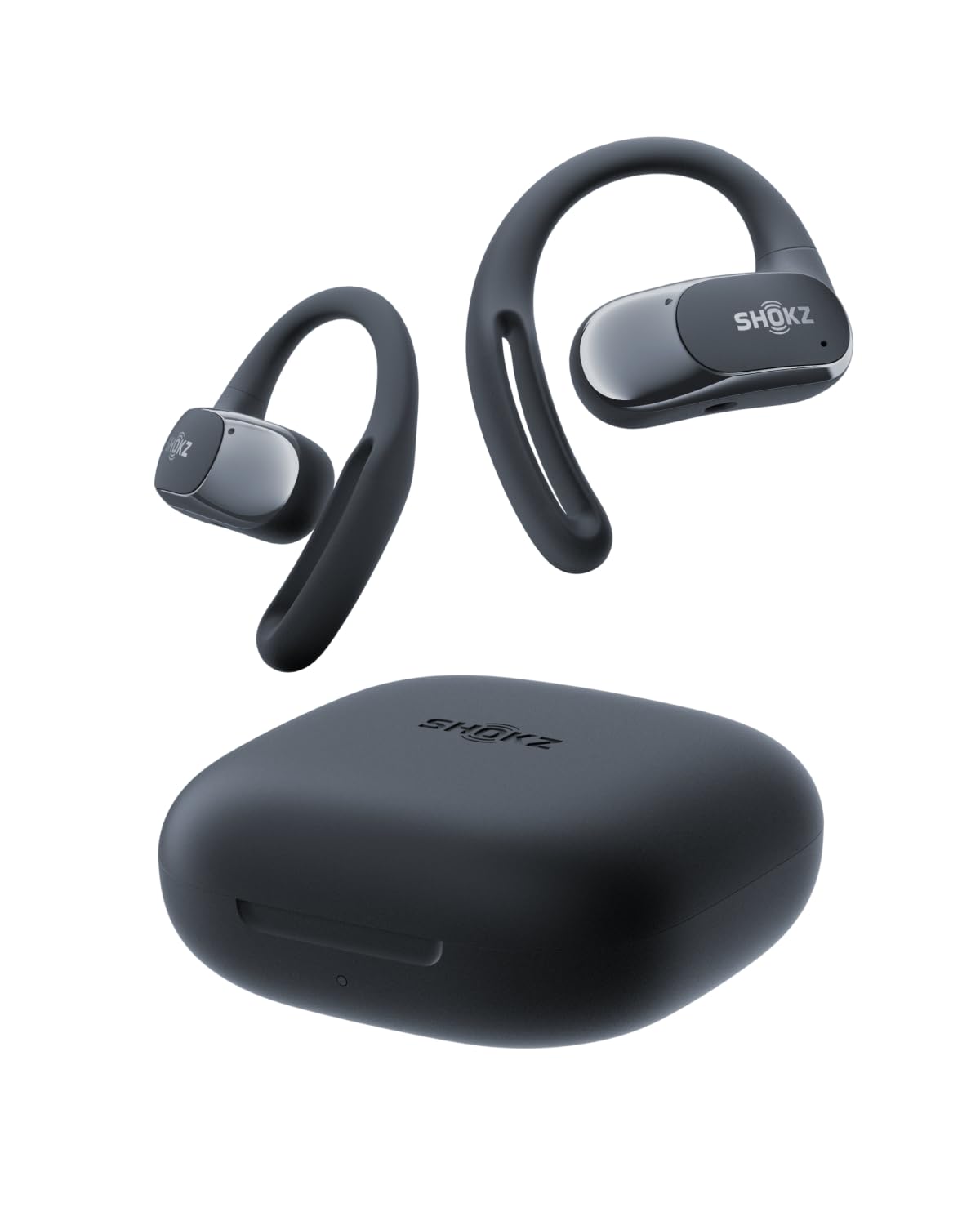
- Multipoint pairing connects two devices.
- Four microphones support calls.
- Battery life is up to 28 hours with the charging case.
Best For: People who prefer open-ear earbuds and need to connect a phone and laptop together.
JLab Flex Open Earbuds
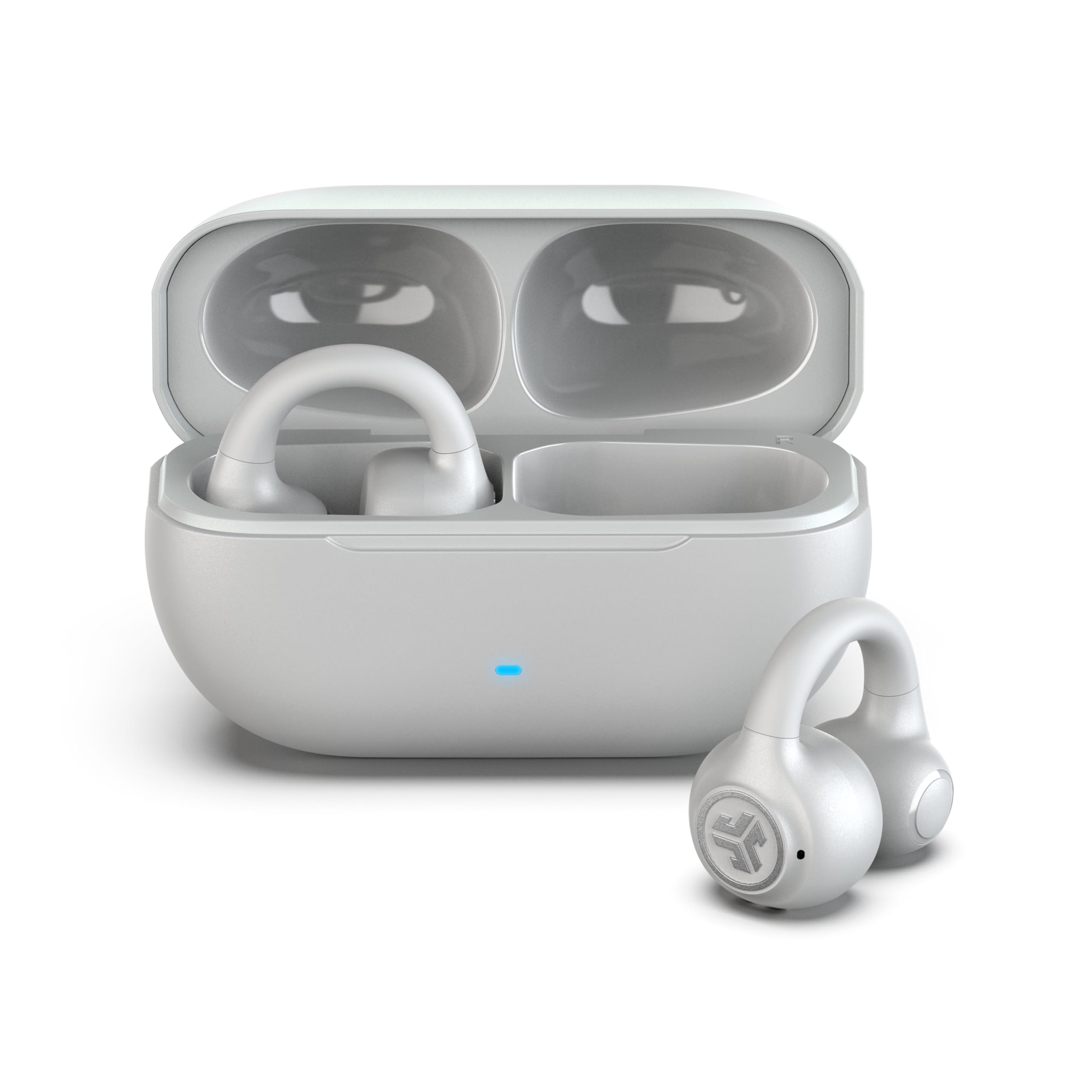
- The clip-on cuff wraps the outer ear without ear tips.
- Bluetooth multipoint connects two devices simultaneously.
- The microphone filters background noise for calls.
Best For: Workers who want clip-on earbuds, open-air listening, multipoint, and a microphone for calls.
Call-Focused Open-Ear Headset
OpenComm2 2025 Upgrade - Open-Ear Bone Conduction Headphones, Wireless Bluetooth Headset with Noise Canceling Mic & Mute Button for Work Calls and Meetings, 16 Hour Talk Time for Mobile & PC - C120
The OpenComm2 is built around work calls, with a noise-canceling microphone, a physical mute button, and bone conduction audio. Its open-ear design lets you stay aware of nearby activity while listening, and the flexible frame weighs 35g.
Multipoint pairing connects two devices, which is useful when calls move between a computer and phone. Battery life is rated for up to 16 hours of talk time or 8 hours of listening per charge.
This is a headset rather than an immersive, isolating music option, so it suits communication and mobile work better than blocking office noise.
Best For: People who spend much of the workday on calls and want to keep their ears open.
| Pros | Cons |
|---|---|
|
|
Choose the OpenComm2 if meetings and call controls matter more than sealing out surrounding noise. The boom-style noise-canceling microphone and mute button are work-specific advantages, while multipoint pairing helps if you use both a laptop and phone.
Its 8-hour listening figure is distinct from the 16-hour talk-time figure, so match the battery claim to your work pattern. Check how the open-ear fit and connection method suit your devices before buying.
Noise-Canceling Over-Ears With Multipoint
TREBLAB Z2 Wireless Over Ear Headphones Bluetooth, Hybrid ANC, 58H | IPX4 Sweatproof, Foldable with Case, Multipoint BT 5.3, Gaming Mode 65ms, 40mm Driver, 2-3H Charge Time
The Z2 combines hybrid active noise cancellation with soft over-ear cushions, making it a practical fit for people who want a more enclosed work setup. Bluetooth multipoint can keep a phone and laptop connected together, and a 3.5mm AUX input provides a wired backup.
Its title gives a 58-hour playtime figure, while the notes describe USB-C charging in 2–3 hours. Foldable construction and a case make it easier to pack between home and office.
The tradeoff is that it covers the ears rather than leaving them open, and the product facts emphasize general noise reduction rather than call controls.
Best For: Office workers who want over-ear cushioning, ANC, and simultaneous laptop and phone connections.
| Pros | Cons |
|---|---|
|
|
Pick the Z2 for a workday split across laptop audio and phone use, especially if you prefer cushioned over-ear headphones and want ANC. Its multipoint connection and AUX backup offer more setup flexibility than a Bluetooth-only approach.
The 58-hour playtime is a headline figure, but the source does not tie it to a specific ANC setting. If meetings are central to your day, check the call experience and microphone controls before choosing it over a call-focused headset.
Boom Mic and Mute Indicator for Meetings
JLab Go Work Wireless Headsets with Microphone, 45+ Playtime PC Bluetooth Headset and Multipoint Connect to Laptop Computer and Mobile, Wired or Wireless Headphones (1 Pack)
The JLab Go Work puts conference-call features front and center. Its rotating boom microphone moves out of the way for listening and back into position for calls, while a red LED indicates when mute is active.
Bluetooth multipoint connects two devices, and the included USB-C to 3.5mm cable supports wired use. The 45+-hour playtime and Cloud Foam earcups suit long stretches at a desk.
This is an on-ear headset, so it does not have the full coverage of an over-ear pair. Its practical controls make it more meeting-oriented than a general listening headphone.
Best For: Remote workers who want a dedicated boom microphone and an easy-to-see mute indicator.
| Pros | Cons |
|---|---|
|
|
Choose the Go Work when video calls are routine and you want a physical boom mic, headset mute controls, and a visible mute indicator. Its multipoint connection can link a laptop and mobile device, while the included cable gives you a wired option.
The on-ear fit and absence of stated ANC make it less focused on isolating a busy office than the Z2 or JBuds Lux ANC. Check whether on-ear pressure and the cable connection suit your desk setup.
ANC for Long Desk Sessions
JLab JBuds Lux ANC, Over Ear Headphones, Active Noise Cancelling, Bluetooth, Limited Edition Navy
The JBuds Lux ANC pairs over-ear Cloud Foam cushioning with hybrid active noise cancellation, so it is aimed at long listening sessions in a distracting workspace. Multipoint Bluetooth connects two devices, and the Be Aware mode lets in surrounding sound when you need it.
The notes give separate battery figures: 70+ hours total playtime and 40+ hours with ANC active. The JLab app can adjust ANC, EQ, and touch controls.
Water resistance is not specified, so these headphones are better suited to desk and travel use than workouts or wet conditions.
Best For: Workers who want over-ear ANC, long battery claims, and two-device Bluetooth multipoint.
| Pros | Cons |
|---|---|
|
|
The JBuds Lux ANC suits workers who want noise reduction plus a way to hear their surroundings without removing the headphones. It gives distinct battery figures for ANC-off and ANC-on use, and multipoint pairing supports switching between a work computer and phone.
Compared with the Go Work, it emphasizes listening comfort and noise control rather than a boom microphone and mute indicator. Check that the touch controls and over-ear fit meet your meeting needs.
Open-Ear Earhooks With Long Case Runtime
SHOKZ OpenFit 2 Open-Ear Headphones,True Wireless Bluetooth Earphones with Microphone,Earhook Earbuds with 48 Hours of Playtime,Fast Charging,IP55 Water-Resistant,with Carrying Bag,Black,Bluetooth5.4
The OpenFit 2 uses earhooks and an open-ear air-conduction design, keeping the ear canal uncovered while providing a secure fit. It is a true wireless listening option with dual noise-canceling microphones for calls and physical buttons for volume, playback, and switching between two paired devices.
The notes give up to 11 hours on a single charge and 48 hours with the charging case. IP55-rated water resistance adds flexibility for commuting or an active day.
It does not provide the focused isolation of ANC over-ears, so consider how much office noise you need to reduce.
Best For: Workers who want open-ear awareness, earhooks, and frequent device switching.
| Pros | Cons |
|---|---|
|
|
Choose the OpenFit 2 if you want earbuds that leave your ears open while supporting calls and two-device switching. Its physical controls are useful when you want to change tracks or answer a call without relying on touch gestures.
The 48-hour figure includes the case, while the single-charge figure is up to 11 hours. It is a better fit for awareness than noise isolation, so assess your office environment before prioritizing it over ANC headphones.
Foldable Over-Ears With On-Headset EQ
JLab, Studio Pro, Wireless Over Ear Headphones, Bluetooth 5, EQ3 Sound, Foldable, Black
The Studio Pro offers a straightforward over-ear design with foldable construction and Cloud Foam cushioning. Bluetooth 5 pairs with phones, tablets, and laptops, and the built-in microphone handles calls.
Three EQ modes are accessible directly on the earcup, so you can change sound without opening an app. The notes state 50+ hours of wireless listening and USB-C charging.
There is no ANC feature in the supplied product details, making this a general work and commuting headphone rather than a noise-blocking headset. It fits buyers who value comfort and uncomplicated controls over specialized call features.
Best For: Workers who want a simple wireless over-ear pair with long stated battery life and on-device EQ modes.
| Pros | Cons |
|---|---|
|
|
The Studio Pro is for someone who wants a comfortable wireless pair for music, podcasts, and occasional calls, with EQ controls directly on the headphones. Its foldable build and 50+ hour battery claim suit a commute-and-desk routine.
It lacks the stated ANC of the JBuds Lux and the call-focused boom mic of the Go Work. Confirm that a built-in mic is sufficient for your meeting setup, and check device switching needs because multipoint is not specified.
Open-Ear Headset for Calls and Awareness
SHOKZ OpenRun Pro-Bone Conduction Headphones, Open-Ear Bluetooth Wireless Sport Headphones for Running and Workout, Sweat Resistant, Long Battery Life, Premium Deep Bass, Mic,with Hair Band, Black
The OpenRun Pro uses bone conduction and a wraparound titanium frame, so it keeps the ears uncovered and stays positioned during movement. It is pitched toward sport, but its built-in mic, ten-hour music and calls figure, and awareness-oriented fit can also suit mobile work or walking meetings.
Its claimed quick charge provides up to 1.5 hours of battery life from five minutes. The open design does not block office noise, and the product details do not specify multipoint pairing or a mute control.
It is more appropriate for awareness and mobility than a quiet, isolated desk setup.
Best For: Workers who want to hear nearby activity while taking calls or listening during movement.
| Pros | Cons |
|---|---|
|
|
Consider the OpenRun Pro for walking meetings or work that takes you between desk and outdoor settings, where awareness matters more than noise isolation. Its battery supports up to ten hours of music and calls, and the quick-charge feature may help when time is short.
Its supplied details do not identify a dedicated noise-canceling call microphone, mute button, or multipoint connection. Check those controls if it will be your main meeting headset.
Compact Wireless On-Ears for Commuting
JLab, Studio, Wireless On-Ear Headphones, Bluetooth, Foldable, Built-in Mic, Black
The Studio Wireless is a foldable on-ear option with Cloud Foam earcups and an integrated microphone for calls and voice commands. Bluetooth 5 provides wireless connection to iOS, Android, and PC, while three EQ presets let you adjust the sound from the headphones.
The notes give a 30+ hour playtime figure, making it suitable for regular commuting and work listening without frequent charging. Its on-ear design is more compact than an over-ear headset but offers less coverage.
ANC and multipoint are not specified, so choose it for basic wireless listening rather than specialized meeting or focus features.
Best For: Commuters and desk workers who prefer lighter on-ear headphones with a built-in mic.
| Pros | Cons |
|---|---|
|
|
Choose the Studio Wireless when portability and simple wireless playback matter more than extensive meeting controls. It folds for a bag, includes a built-in microphone, and provides onboard EQ presets.
Compared with the Studio Pro, this is an on-ear model with a shorter stated playtime, while the Pro uses an over-ear fit. If work involves frequent calls or switching between laptop and phone, verify that its basic mic and connection setup will be enough.
Open-Ear Buds With Multipoint Pairing
SHOKZ OpenFit Air - Open-Ear Headphones, True Wireless Earbuds, Water Resistant, Secure Earhooks for Daily Use, Black
The OpenFit Air is a true wireless earhook design with an open-ear fit, so it leaves the ear canal uncovered. Four microphones, multipoint pairing, and IP54 water resistance make it a flexible choice for work calls and everyday movement.
The notes give up to six hours on a single charge and 28 hours with the case, along with a quick ten-minute charge for up to two extra hours. The open-ear format supports awareness but does not provide the isolation of over-ear ANC.
Its Shokz app includes EQ modes and customizable controls.
Best For: People who prefer open-ear earbuds and need to connect a phone and laptop together.
| Pros | Cons |
|---|---|
|
|
The OpenFit Air fits workers who want wireless earbuds that keep their ears open and can stay paired to a phone and laptop. Multipoint and four microphones make it more call-capable on paper than open-ear models without those specified features.
The six-hour single-charge runtime is notably different from its 28-hour total with the case, so consider how often you can recharge. It will not offer the same distraction reduction as closed ANC headphones.
Clip-On Open-Ear Buds for Calls
JLab, Flex, Open Ear Earbuds, Clip On Wireless Bluetooth Earbuds, Open Ear Headphones, Cloud White
The JLab Flex uses a clip-on cuff that wraps around the outer ear instead of placing tips inside the ear canal. Its 12mm open-ear speakers and bass boost are intended to keep audio audible while preserving awareness.
Bluetooth 5.3 multipoint connects two devices, while the MEMS noise-canceling microphone supports calls. The notes give more than seven hours per earbud and 21+ hours including the case.
IPX4 resistance covers sweat and light rain. Because the earbuds leave the ear open, they are not designed to block a noisy office like ANC over-ears.
Best For: Workers who want clip-on earbuds, open-air listening, multipoint, and a microphone for calls.
| Pros | Cons |
|---|---|
|
|
Choose the Flex if you want open-ear earbuds with a clip-on hold and simultaneous laptop and phone connections. The call microphone, app EQ, and sweat resistance make it adaptable to a desk routine that includes movement.
Its case total should not be confused with single-charge use: the notes specify 7+ hours per earbud and 21+ with the case. If you need to shut out office chatter, an ANC over-ear model is a better match.
How to Choose Headphones For Work
How We Picked Headphones for Work
This selection favors features that change how headphones function during a workday: microphone and mute controls for meetings, multipoint pairing for laptop and phone use, ANC for reducing distractions, and open-ear fits for staying aware of coworkers. We also included straightforward wireless options for buyers who want comfortable listening and a built-in mic without a call-center style headset.
Use case matters more than a single universal feature. The OpenComm2 is the most explicitly call-oriented choice, while the JBuds Lux and TREBLAB Z2 bring ANC and over-ear coverage.
Open-ear models suit workers who need to hear the room. The Studio Pro and Studio Wireless offer more basic listening setups.
Comparing Work Headphones
The largest difference is how much of the room you hear. ANC over-ears such as the JBuds Lux and Z2 cover the ears and are intended to reduce distractions.
Open-ear products such as the OpenComm2, OpenRun Pro, OpenFit 2, OpenFit Air, and JLab Flex leave the ear canal uncovered, helping you remain aware but letting more ambient sound through.
Connection details matter when your work moves between devices. Multipoint is specified for the OpenComm2, Z2, Go Work, JBuds Lux, OpenFit 2, OpenFit Air, and JLab Flex.
The Go Work and OpenComm2 also have clear physical call controls, while the Studio options emphasize general listening and built-in microphones. Check the devices you use and whether you need simultaneous connections, a wired fallback, or a visible mute control.
| Product | Standout features | Best for |
|---|---|---|
| SHOKZ OpenComm2Check Price |
| People who spend much of the workday on calls and want to keep their ears open. |
| TREBLAB Z2Check Price |
| Office workers who want over-ear cushioning, ANC, and simultaneous laptop and phone connections. |
| JLab Go WorkCheck Price |
| Remote workers who want a dedicated boom microphone and an easy-to-see mute indicator. |
| JLab JBuds Lux ANCCheck Price |
| Workers who want over-ear ANC, long battery claims, and two-device Bluetooth multipoint. |
| SHOKZ OpenFit 2Check Price |
| Workers who want open-ear awareness, earhooks, and frequent device switching. |
| JLab Studio ProCheck Price |
| Workers who want a simple wireless over-ear pair with long stated battery life and on-device EQ modes. |
| SHOKZ OpenRun ProCheck Price |
| Workers who want to hear nearby activity while taking calls or listening during movement. |
| JLab Studio WirelessCheck Price |
| Commuters and desk workers who prefer lighter on-ear headphones with a built-in mic. |
| SHOKZ OpenFit AirCheck Price |
| People who prefer open-ear earbuds and need to connect a phone and laptop together. |
| JLab Flex Open EarbudsCheck Price |
| Workers who want clip-on earbuds, open-air listening, multipoint, and a microphone for calls. |
Choosing a Work Headset for Meetings
For frequent video calls, prioritize a microphone you can position and mute without hunting through software. The JLab Go Work has a rotating boom mic, headset controls, and a red mute indicator.
The OpenComm2 combines a noise-canceling microphone with a physical mute button and open-ear fit. By contrast, built-in earbud or headphone microphones offer a simpler setup, but the specific call controls vary by model.
If calls take place around other people, consider whether an open-ear design fits your needs. These models preserve access to surrounding sound, but they will not reduce office chatter like ANC headphones.
For a quieter listening environment, the JBuds Lux offers ANC with a Be Aware mode, while the Z2 combines hybrid ANC with multipoint and an AUX connection.
Comfort, Battery, and Daily Use
Headphone fit is personal, so decide whether you prefer on-ear, over-ear, or an earhook before focusing on other features. The Go Work and Studio Wireless sit on the ears; the Studio Pro, Z2, and JBuds Lux cover them; the Shokz and JLab open-ear options use wraparound, earhook, or clip-on designs.
Cushion style and pressure points can matter over long sessions, so check the fit details for the form factor you usually wear.
Battery numbers use different terms. Some products give a single-charge runtime, while others include the charging case or separate ANC-on from ANC-off playtime.
The JBuds Lux has separate total and ANC-mode figures; the OpenFit 2 and OpenFit Air distinguish single-charge time from case totals. A wired fallback is specified for the Z2 and Go Work, which may help if you prefer not to depend on wireless battery for every session.
Who Should Buy Which Headphones for Work?
For a call-heavy schedule, compare the OpenComm2 and Go Work: one keeps the ears open, while the other has a rotating boom mic and visible mute indicator. Choose ANC over-ears such as the JBuds Lux or Z2 if you want more focus in a noisy workspace, and check the call controls you need before deciding.
For awareness and mobility, consider the OpenFit 2, OpenFit Air, JLab Flex, or OpenRun Pro. The OpenFit 2 specifies physical controls and multipoint; the OpenFit Air and Flex also specify multipoint, while the OpenRun Pro emphasizes a wraparound bone-conduction fit.
If calls are occasional and portability is the priority, the foldable Studio Wireless or Studio Pro offers a simpler headphone setup.